This article is an overview of Scrum and XP.
Roles
There are three main roles in Scrum. Each of it has some special responsibility.
Product Owner (PO)
The Product Owner is the connection between the Team and the stakeholders or clients. He’s the only one who is allowed to give tasks to the Team. The Product Owner should not be part of the Team. The Product Owner maintains and manages the Product Backlog, release plane and the Return of Investment.
The Product Owner is not part of the team and there should be only one Product Owner per product.
Scrum Master (SM)
The Scrum Master is responsible that the Scrum process is working properly and that everybody plays by the rules. He’s also in charge if there are problems in the work progress of the Team and to remove any impediments. He has to solve social problems and organize anything that helps the Team to work productively. Ideally the Scrum Master isn’t part of the Team. But often he is a member of the Developer-Team.
Team
The Team is the group of people (usually developers) that do the work. They turn the Backlog into an working increment of the product within a sprint. The team is self organizing. That means they decide how they do something. Ideally every teammember can do anything needed in the team. But sometimes there are special roles like teser, documentation writer or specialists of any kind.
The main tasks of the Team are:
- Development (coding)
- Unit Tests
- Definition of Done
- Development Documentation
- Organize themselves
Other
There are no other people involved in the productive work cycle than the three mentioned above. If someone wants the Team do something he has to speak with the Product Owner. At some presentations and meetings there are guests allowed. But they can’t decide anything or delegate any work to the team.
There are some other people that are indirectly involved in the project. They are generally called Stakeholder. The most important ones are:
- Customer
- User
- Management
There are two kind of people involved in a project. In Scrum jargon they are called Chickens and Pigs. This roles are based on a comic strip:
Chickens
There are always some people which have ideas, like to criticize, talk a lot about the project and try to get the reputation at the end. But they don’t do any work or just a little. They are called the Chickens.
Pigs
On the other hand there are the kind of people that are highly involved in and motivated for a project. They do all the hard work and take some amount of risk. In Scrum they are called the Pigs.
Timeboxes (Rituals)
In Scrum all work is donne in time-boxes of defined length. The length of any time-box is defined by the involved people in advance! Adjust the times if needed (retrospective).
Use a timer!
The Sprint
The most important timebox is the Sprint. It is a time span of two to four weeks (in most Teams it’s 2 weeks). In this time the team works on the tasks they have themselves comitted to at the Scrum Planning Meeting. At the end of this time span the team should be able to present a product that can be potentially delivered to the customer.
The product should be (before the sprint ends):
- thoroughly tested
- documented (developer and customer documentation)
- well developed (architecture, unit tests, design…)
To achieve this goal there are several meetings that help to do the work organized and on the right time.
A Sprint has this pattern:
- Sprint Planing Meeting
- Daily Scrum (every day for 15 minutes)
- Sprint Review
- Retrospective
Release Planning Meeting
In this meeting the team and the product owner discuss when the next release should be finished and what requirements shoud be included into this release. They discuss the time each requirement needs to be implemented. And they discuss the urgency of each requirement. Basically the Team decides the time needed for implementing a requirement and the Product Owner decides about the urgency. All the requirements are stored in a list called the Product Backlog. The Release Planning Meeting can be merged into the Sprint Planning Meeting if after each Sprint a real release is created.
Sprint Planning Meeting
The Product Backlog needs to be clean before the Sprint Planning Meeting!
At the beginning of each Sprint the Team, the Scrum Master and the Product Owner decide which of the requirements of the Product Backlog are going to be implemented in the new Sprint. They are put into the Sprint Backlog. If needed the User Stories can be split into smaller Tasks.
The Planning Meeting takes about one day (take the needed time!)
The meeting has three phases:
- The objective (goal) of the sprint (PO, 30 minutes)
- Pre-Selection of requirements (PO, 3 hours)
- Analyze the requirements and split them to smaller tasks (activities)
→ put them in the Sprint Backlog (Team, 4 hours)
The output of the meeting is:
- A sprint goal
- A list of team members (and their time commitment)
- A sprint backlog
- A demo date and place
5 - 15 Stories per Sprint is usually a good number.
If the Sprint Planning Meeting takes to long the Scrum Master shall cut it short or reschedule it.
Publish Sprint Goal
Keep the whole company informed about what is going on.
Publish short notes:
- Web/Intranet
- Wiki
- Printout (on door…)
If people are not informed they will complain. Or they assume that the team is working on something but it isn’t.
Product Backlog Refinement
It usually makes sense that backlog refinement (estimation, story splitting, etc.) is donne in a separate meeting (one hour per week) so the Sprint Planning can be more focused.
So the needed time for the sprint planning meeting can be reduced. Rule: Number of weeks per sprint * 1 hour
It’s not accepted to reduce the estimate of the story in exchange of quality!
Some teams estimate only the stories that go in the sprint backlog in the sprint planning meeting.
Estimation
The effort of each user story has to be estimated by the team (only by the team!).
It is one of the most difficult parts of Scrum. But there are some techniques for doing the estimation.
Storypoints The user stories are estimated in story points. Don’t bother at first about how much work exactly a story point is. It depends on the team. And after a few sprints it becomes clear how many story points can be acomplished in one sprint.
So how to define story points? Just chose a really small task (maybe just find the smallest user story in the backlog) and assign it the amount of one story point.
Now it makes sense to define a range for the possible story points. The fibonacci numbers are a commonly used range:
1, 2, 3, 5, 8, 13, 21, 34, 55, 89 …
For really small tasks the value of 1/2 can be added.
If a user story is too big it should be split in smaller stories or tasks.
When the range is defined the estimation can be done. There are quite a lot of possibilities to do the estimations.
Planning poker
The planning poker is a very good tool for the estimation of story points: Planning Poker
Gut feeling
It’s a good practice to ask the team if they have a good feeling about the estimation. Ask it at least at the end of the estimation meeting (Product Backlog Refinement or Sprint Planning).
Experience of previous Sprints
After a few Sprints the team gets some experience in estimating User Stories.
Stories and Tasks
Each story can be divided into smaller tasks by the team. This makes estimation easier. And it helps the team when implementing the story.
The tasks don’t need to be represented in the backlog. It’s too detailed and they can change often.
Overview
This is an overview of who attends which meetings and the aproximate time that the meeting should take (for a 2 week sprint).
| Meeting | Sprint Planning | Daily Scrum | Sprint Review | Retrospective |
|---|---|---|---|---|
| PO | Owner | only if needed | Paricipant | Paricipant |
| SM | Paricipant | Owner | Paricipant | Owner |
| Team | Paricipants | Paricipants | Owner | Paricipants |
| Others | no | may silently attend | yes | only if invited |
| Timebox | 4 hours | 15 minutes | 2 hours | 2 hours |
Sprint Goal
It’s difficult to define a sprint goal. But it should be donne!
Just ask the question: “Why are we doing this sprint? We could do something else.”
The sprint goal should be in business terms, not technical terms
Daily Scrum
Every day the Team gathers for a fifteen minutes standup meeting and every member gives answers to the following questions:
- What have I donne since the last meeting.
- What am I going to do until the next meeting.
- What are my actual problems.
There should be no discussions in this meeting
It’s just an information to the coworkers so people with similar interests or some good solutions can connect after the meeting.
The sprint progress should be checked (by viewing the burndown chart) and adjustment to the sprint shall be made if necessary.
Sprint Review (Presentation)
When a Sprint is finished the Team presents the result. Anyone can join the presentation. Everybody is allowed to try out the resulting product. It should not be a pure presentation but more like a workshop. In this meeting the Product Owner (alone) decides if all the requirements are implemented completely. For each requirement this is a pure yes or no criteria. The product that is shown at the review is potentially shippable to the users (Product increment).
The review meeting should take about 4 hours and the team should need at most 2 hours to prepare it.
The Sprint Review is about feedback
- Insist on the Sprint Review
- The team gets credit
Checklist:
- Present Sprint Goal (PO)
- What was good/bad (team)
- Don’t waste time in preparing the Review
- Show product
- Workshop style: everybody is allowed to check out new features
- Focus on working code
- Fast and not beautiful
- Business oriented
- leave out technical detaion
- ‘what did we do’ (not ‘how did we do it’)
- Let the audience try the product (if possible)
- No powerpoint…
Retrospective
The Retrospective is a very important meeting. All involved people have to attend this meeting (PO, SM, Team). No other people are allowed in this meeting. It is moderated my the Scrum Master. The topic of the meeting is to discuss the Scrum process of the last Sprint. There should be discussed what was good and what was bad. There have to be decided what steps will be donne to improve the production cycle.
It should take place after the Review.
No PC’s are allowed.
After the retrospective a new Sprint starts with the Sprint Planning Meeting.
- one hour for a two week sprint
- longer (half-, full-day) every few month
It’s the possiblity to improve!
- Without Retrospective mistakes are repeated over and over again
Organisation:
- Members: OP, team, Scrum Master
- Closed room
- Designated secretary
- Summarize sprint
- Each person gets the chance to talk without getting interrupted
- respect each other
- be honest
- don’t take things personally (separate person from things)
- talk abut good things and what could be improved
- how they are feeling
- what is expected
- It can help if everybody writes down its topics on a card
- then one after the other presents his/hers card
- write down what was good and what was bad
- feelings
- expectation
- Analyze processes and social topics
- Discuss if result (of sprint) is achieved and why (or why not)
- Formulate goals for improvement and make them public (i.e next to Scrum Board)
- If needed reformulate rules
- Coding standards
- Definition of Done
- Processes
- Documentation rules
- …
- Retrospective of Retrospective (5-10 min)
Focus on few improvements for new sprint
Artefacts
Product Backlog
The Product Backlog is a list with all Requirements that have to be donne to improve the product. The only person that can put new requirements into the Product Backlog is the Product Owner. Each requirement has to have several properties when put into the Backlog.
- ID (unambigous)
- Significance/Importance (unambigous, set only by PO)
- Initial Estimate/Effort (set only by Team in the Refinement Meeting)
- Name
- Label/Topic
- Description (User story / use case, “As X, I want Y, so that Z”)
- Criteria for aceptance
- Notes / References
- Source (who added this requirement)
- Risk
- How to Demo
- Bug tracking ID
- Components (i,e Database, UI, Business-Logic…)
The Product Owner is responsible for the Product Backlog. He has to understand each item and he has to decide about the significance of the items. But he is not allowed to estimate the effort of an item. This can be only done by the team.
It’s a good practice to estimate the most significant backlog items that are not estimated yet once a week.
There should be only one Product Backlog per product.
Requirements
- Simple
- Measurable
- Achievable
- Realisitc
- Traceable
User Stories
- Independant
- Negotiable
- Valuable
- Estimatable
- Small
- Traceable
Tasks
- Time boxed
- Everybody can do it
- Complete
- Human readable
Sprint Backlog
The whole team should be involved in maintaining the Sprint Backlog
Sprint Burndown Chart
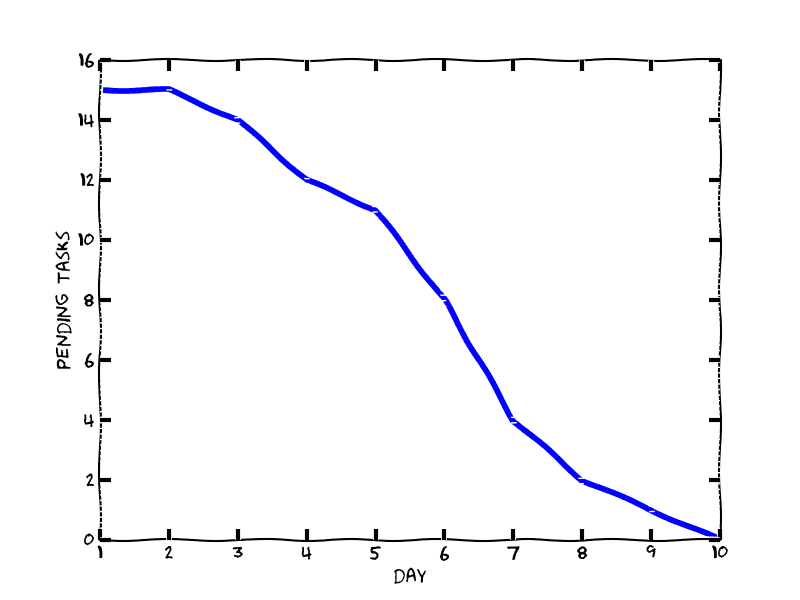
There’s a good article about the Burndown Chart.
Release Burndown
Tools
Scrum Board
The Scrum Board (Task Board) helps the Team (and the PO) to have an overview about the actual ongoing work. It’s inspired by Kanban. Each team has a slightly different Scrum board but they have similarities.
There are three main sections on the Scrum Board:
- Backlog
- In Progress
- Donne
A backlog item moves from Backlog to In Progress when someone has started to work on it. After it’s finished it moves to the section Donne (see Definition of Donne).
The items should be sorted by importance from top to bottom.
It’s possible to add additional information:
- Sort by importance (top to down)
- Add subtasks
- Add colors (issue, bug, test, documentatin …)
- Add a mark on the cards for each day that was worked on the topic
Index Cards
All the Backlog items should be printed (or written) on index cards. So it’s easier to handle them on the Scrum Board.
Handling items on index cards can also simplify the Sprint Planning Meeting or the Backlog Refinement.
It’s a good idea to add a mark (sticker) on a index card for each day the issue is in the progress state. The marks can have different colors (i.e Coding, Testing, Documentation …)
The index card is a promise to have a disussion about the topic on it.
The index card forms the basis of discussion with the team, PO, stakeholders …
Definition of Donne
The team with the PO need to decide what requirements need to be fulfiled for a story to be marked as done.
Code complete is not feature complete!
The best approach is to define a checklist for the stories. i.e:
- Feature/Bug is completely implemented
- Unit Tests are written
- Developer documentation is written
- Customer documentation is written
- …
Maybe for different kind of stories (features, bugs, …) a different checklist is needed.
Impediment Backlog
- What do I need to fulfill my task. i.e
- A server
- WiFi isn’t working
- Order a book
eXtreme Programming (XP)
Extreme Programming has no roles and no process. There are just a few artefacts and about 25 rules:
- Pair Programing
- Developers should thing loud
- Switch roles every 20 minutes
- It’s very tiring (exhausting)
- No overtime (because it’s tiring)
- Refactoring
- Regularly
- After small development steps
- TDD/Testing
- Code coverage: 100%
- Continous integration
General Notes
Tools Day
Plan a fixed timebox each Sprint (i.e each Friday Afternoon) for working on tools and internal tasks. This allows to improve and fix internal tools that otherwise would be postponed regurarly (even endlessly).
This doesn’t mean nobody is allowed to work on tools in the usual working time. But it’s not allowed to work on stories on Tools Day.
Knowledge Sync-Up
Take regularly some time to synchronize internal knowledge between team members. Imagine for each team member what knowledge he/she has that wold be lost/missed if that memer leaves the company. Then try to share this knowledge with as many other team members as possible.
Pair Programming
- Improve code quality
- Improve team focus
- Should not be done all day (exhausting)
- Changing pairs frequently
- Spread knowledge fast in team
- Both developer should have a computer at hand
- Don’t force pair programming, encourage people